Sunday, 31 August 2014

Picasa Hub + Backup Now Available

Well I've done it. If you're a long time reader of this blog, you may have noticed that I have had tendencies to start projects without ever finishing them. Sometimes due to the size of the project being far to big for me, or because the concept has never panned out. And sometimes, the project never had the intention of being released in the first place.

Well today, I've reached a new milestone. My app, Picasa Hub + Backup, has now been released to the masses for the low low price of FREE. If you are an active Picasa user, or have just come over from competing platforms, then Picasa Hub + Backup should provide you with everything you need to keep enjoying the service. At the moment the application is ad-supported to (hopefully) help pay for my Windows Phone Store membership, but there will be an option in the near future to remove ads for a small price in select countries.

If you're a member of the press and I have failed to contact you, please download the press-kit from the website and let me know if you write a review (good or bad). And of course, everyone should go out and download it now for FREE.

So what's next? Well I will be working on a new app, which will hopefully be released a lot sooner, along with an update to Picasa Hub + Backup to bring new features (which may be related to the new app).

So go download Picasa Hub + Backup, tell your friends and family and write positive reviews...

Saturday, 21 June 2014

Picasa Hub + Backup - Update 2

Once I released the beta of the first version of Picasa Hub + Backup, I started work on the next update. As teased in the previous post, I was working on the following features:
  • View and add comments for a photo
  • Configure your target album for your backups and shared photos
  • Configurable ordering of photos albums in photo hub.
As you can see below, these features were successfully added into the update:


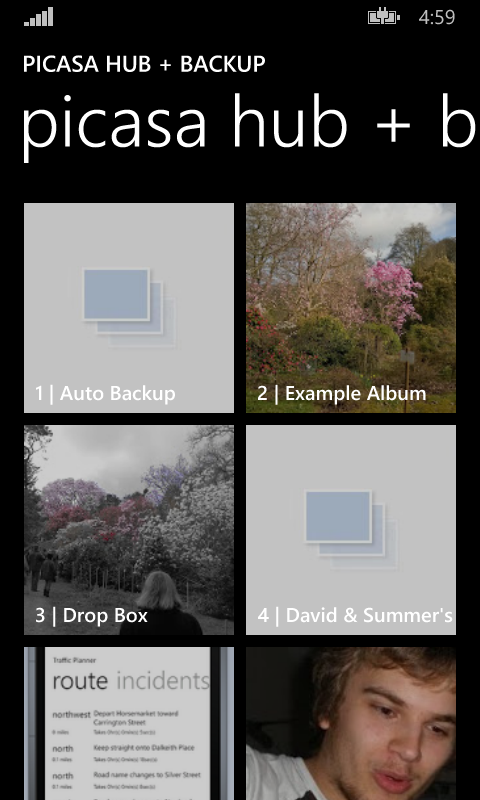
Unfortunately, the feature that allowed the user to select the order in which albums were ordered when viewed within the photo hub resulted in me having to get a little creative. The API that Microsoft have provided only allows the albums to be displayed in ascending order of title. This proves to be problematic if you want your most recent albums first as there's no way of doing this.

To accomplish this, I looked into ordering my albums and then prefixing the titles within the photo hub to have a set number of non-printable characters that came before the standard alphabet. My thinking was that the sorting would take these characters into account and would force the albums into a given order while preserving the original album name, due to the ascii version of the non-printable characters coming before the standard alphabet. However, this resulted in the entire album name not being rendered. In the end I resulted in prefixing the titles with numeric values (as seen in the screenshot above). It's not brilliant, but at least the photo hub is more usable. I just wish the photo hub itself was updated to support sorting of different criteria.

I also updated my "about" screen so that it includes an inbuilt change log which is downloaded from a remote source. My intention is that users can then see easily when updates are available (if they're not updating automatically) and see what features (and possible bug fixes) are awaiting them in the update.

I also encountered a lovely issue with the certification process when I released this new update to the marketplace. The build worked on both the emulators and devices I had tested, passed certification but failed to install when downloaded from the store. The culprit? A reference to the splashscreen file which didn't exist within the resources in one of the manifest files. Hopefully Microsoft will catch this issue in an update to the certification process or an update when deploying packages locally in the near future. That would be very embarrassing had it happened on a public listing.

I'm now working on a third (and hopefully) final update before I release the application publically  where I'm investigating (and hopefully implementing):
  • Fixing a bug where web requests aren't returning
  • Backing up files at a reduced resolution so that it falls within the users free allowance
  • Rendering issues with comments
  • Advertisements on select screens (with in app purchase to remove them)
Here's to the next couple of weeks...

Thursday, 29 May 2014

Work In Progress: Picasa Hub + Backup

Recently a colleague of mine switched from Android to Windows Phone. From the switch he jumped straight into the Windows Phone 8.1 preview and has managed to find decent alternatives to the applications he used while on Android. Like many Android users, he used the Picasa services (or Google+ photos as I think it's now known as) to store and backup his pictures, for which he has a backlog of a few years. But he has failed to find a decent Picasa app that satisfies his cravings. This is showcased event more with the introductions of new features in 8.1 that the existing apps haven't embraced like photo hub integration.

This sounded interesting to me and so I've been developing "Picasa Hub + Backup" for the past month.


At first, my main goals were simple:
  • OAuth authentication - No applications on the market appears to offer this
  • Photo Hub Integration - No applications on the market appears to offer this
  • Automatic Backups
  • Share photos from other sources to Picasa service - Other applications appear to be limited to the photo hub as a source for the upload.
These features have been implemented and I've since released a preview\beta of the application which at the moment only has a single participant, my colleague.

I'm now working on a second release which will include:
  • View and add comments for a photo
  • Configure your target album for your backups and shared photos
  • Configurable ordering of photos in photo hub.
If this seems interesting to you, you are on the 8.1 developer preview and you would like to be involved in my preview\beta, then let me know by sending the Microsoft account associated with your windows phone(s) via either twitter (via private message) or via email at apps [@] davidskendall [.] co [.] uk.

Wednesday, 21 August 2013

Form Posts and the BackgroundTransferService


At the time of getting my Windows phone I was the owner of an app membership which at the time allowed me to develop apps for the phone. I wanted to create an app that interacted with a personal file server, which allowed files to be uploaded to it via a form post online. I achieved this by using WebRequest objects, but due to the limitation of Windows phone apps this meant that I had to stay within the app in order to complete the upload, which was not ideal. Then Mango came out and with it the BackgroundTransferService, which allowed uploads and downloads to happen regardless of the state of the app that initiated them. So I set out to upgrade my app to upload the files via this new background service, but couldn't for the life of me to get it to work so I gave up. My app membership then ran out, meaning that I could no longer use the app anyway and the code just became a folder on my computer gathering virtual dust...

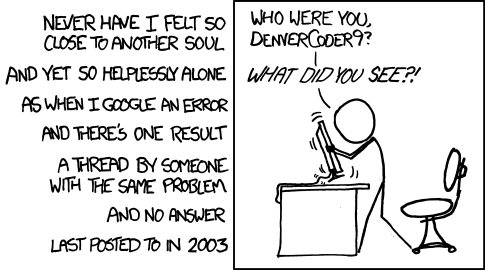
Fast forward to a few weeks ago (strangest statement ever) and Microsoft announce that anyone can develop and deploy up to two apps on any one phone, for free. So, I decided to redesign my application from the ground up and starting by attempting to conquer the BackgroundTransferService once again. I started by googling (or binging, yahooing, asking, etc) my problem to see if anyone had had success in this area as a lot can happen in a few years. No one had. I then manged to find a post detailing MY EXACT PROBLEM. My face lit up. Was my search finally over? I scrolled to the bottom for an answer. No answer. I looked to see who posted it. It was me when I was first having the problem. An example that in the XKCD scenario (shown above), the poster doesn't necessarily know of a solution because I knew nothing.

I decided to attempt once again the solution that the post gave me. I downloaded Fiddler, posted a file using the BackgroundTransferService, posted a file using the web form and examined the result. Not surprisingly, the BackgroundTransferService post was missing a bunch of information that was included in the web form post, and instead was just posting the raw file binary. No boundaries of anything. But why would it? I hadn't told it to. After messing around with the Headers property and about to give up, I had one final idea. One that I thought would never work because I thought it was hacky as hell. What if the stream I stated to upload was in fact the contents that are uploaded via a web form post.

using (IsolatedStorageFileStream stream = storage.CreateFile(@"shared/transfers/" + tb_Filename.Text))
{
    StringBuilder content = new StringBuilder();
    content.AppendLine(String.Format("-----------------------------{0}", boundary));
    content.AppendLine(String.Format("Content-Disposition: form-data; name=\"file\"; filename=\"{0}\"", tb_Filename.Text));
    content.AppendLine(String.Format("Content-Type: image/jpeg"));

    content.AppendLine();

    byte[] contentAsBytes = Encoding.UTF8.GetBytes(content.ToString());
    stream.Write(contentAsBytes, 0, contentAsBytes.Length);

    content.Clear();

    _selectedStream.Position = 0;

    byte[] buffer = new byte[16 * 1024];
    int read;
    while ((read = _selectedStream.Read(buffer, 0, buffer.Length)) > 0)
    {
        stream.Write(buffer, 0, read);
    }

    content.AppendLine();

    content.AppendLine(String.Format("-----------------------------{0}--", boundary));

    contentAsBytes = Encoding.UTF8.GetBytes(content.ToString());
    stream.Write(contentAsBytes, 0, contentAsBytes.Length);
}

BackgroundTransferRequest request = new BackgroundTransferRequest(new Uri(Uri.EscapeUriString(Page_Upload.UploadDestination), UriKind.Absolute));
request.UploadLocation = new Uri(@"shared/transfers/" + tb_Filename.Text, UriKind.RelativeOrAbsolute);
request.Method = "POST";
request.Tag = tb_Filename.Text;
request.TransferPreferences = TransferPreferences.AllowCellularAndBattery;

request.Headers.Add(new KeyValuePair("Content-Type", String.Format("multipart/form-data; boundary=---------------------------{0}", boundary)));
BackgroundTransferService.Add(request);

I selected a file, hit the Upload button and checked my file server. And with much surprise (although looking back I don't see why), the file was there.

So as can be seen, the BackgroundTransferService can used to upload all types of data in all types of form. You just need to know how. Or in my case try everything else.

Update: It appears this blog post may be more helpful if it includes the php code it was interacting with. So here is a stripped down version of it
<?php
 if ($_FILES["file"]["error"] > 0)
 {
  echo "Return Code: " . $_FILES["file"]["error"] . "
";
 }
 else {
  move_uploaded_file($_FILES["file"]["tmp_name"],
           "./" . $_FILES["file"]["name"]);

  echo "Successful";
 }
?>
<form action="upload_file.php" method="POST" enctype="multipart/form-data">
  File: <input type="file" name="file" />

  <input type="submit" value="Submit" />
</form> 

Thursday, 30 August 2012

Side Project: Sms Messaging Service

I love going to the cinema. There's something about watching the latest blockbuster (or sometimes in my case the latest flop) on a big screen in seats you would never dream of buying for your home with a cup of fizzy that is incredibly overpriced. OK, so maybe that last part I'm not so fond of. But still, the cinema is great. It's even better in the UK if you own a mobile on the Orange network as you can get 2 for 1 tickets for use on wednesdays. Unfortunately, my primary phone is no longer on the Orange network, but to overcome this problem I have kept my old Orange PAYG sim and an old phone and can continue to reap the benefits of this offer.

The problem with this is that I either need to keep this Orange phone on my person at all times (just in case I want to go to the cinema), or I need a phone that will allow me to swap sims over for when I want a ticket. This is clumsy and not ideal. If only there was a way for me to send a text message to my Orange phone, which would then make the request for me and forward the Orange wednesday ticket onto my non-orange phone. Wait a minute...I'm a programmer. Of course there's a way.

My first task was to find out if there was a already a way available to do the hard part of the process for me...sending/receiving text messages from\to a connected phone through a computer. Luckily, there's a bunch of these solutions. The two I tried were gnokii and it's child project gammu. Both solutions involve communicating with a connected phone through AT commands which seem to be implemented in some form or another with most modern day mobile phones. This means that connecting to non-smartphones are possible,even if the solution isn't advertised anywhere. Both gnokii and gammu also offer what's known as an sms-daemon, which is a service that polls a connected phone for inbound text messages and a given directory for outbound messages. These messages are saved in text format, which means that the messages can be easily parsed and processed. This service is the thing that would be the backbone of my project for the sending/receiving of messages; and due to better documentation, platform agnostic-ness and better support, gammu was the sms-daemon solution that I ended up using. After much faffing around I managed to get text messages being sent and received through a friends Sony Ericsson w580i phone.

So I had a facility for receiving and sending text messages, now I needed to process those messages and do something with them. In comes the programming part of the project. The concept was simple. To build an application that polled the inbound directory for inbound messages and process them based on message content and/or the number the message was sent from. The processing of the message content could then lead to subsequent messages being sent. It also needed to be built to allow easy extendability in case either a) I chose a different method/sms-daemon for retrieving/sending the text messages or b) I wanted to produce future services that were driven from sms content. This lead to the following process:

As you can see I have a concept of message processors and handlers. The processor is what translates the universal message to/from the message retrieval format (in this case gammu). The handlers (in this case just the Orange Wednesday Handler) is what processes the messages and decides what to do with it. The Orange Wednesday Handler when receiving a text message goes through the following process:

This logic was important as I didn't want to send text messages to Orange unnecessarily as each text costs money. As you can see to prevent this, a few checks are made before the text message is sent. I have also built into the handler the ability to re-ask for the code just in case it's accidentally deleted.

So I had the concept of the program boiled down, but what was I going to program the application in. The first language that sprung to mind was C#. I have been using the language for over three years both leisurely and for work. But this was quickly ruled out as one of the things I wanted the application to run on was one of these.
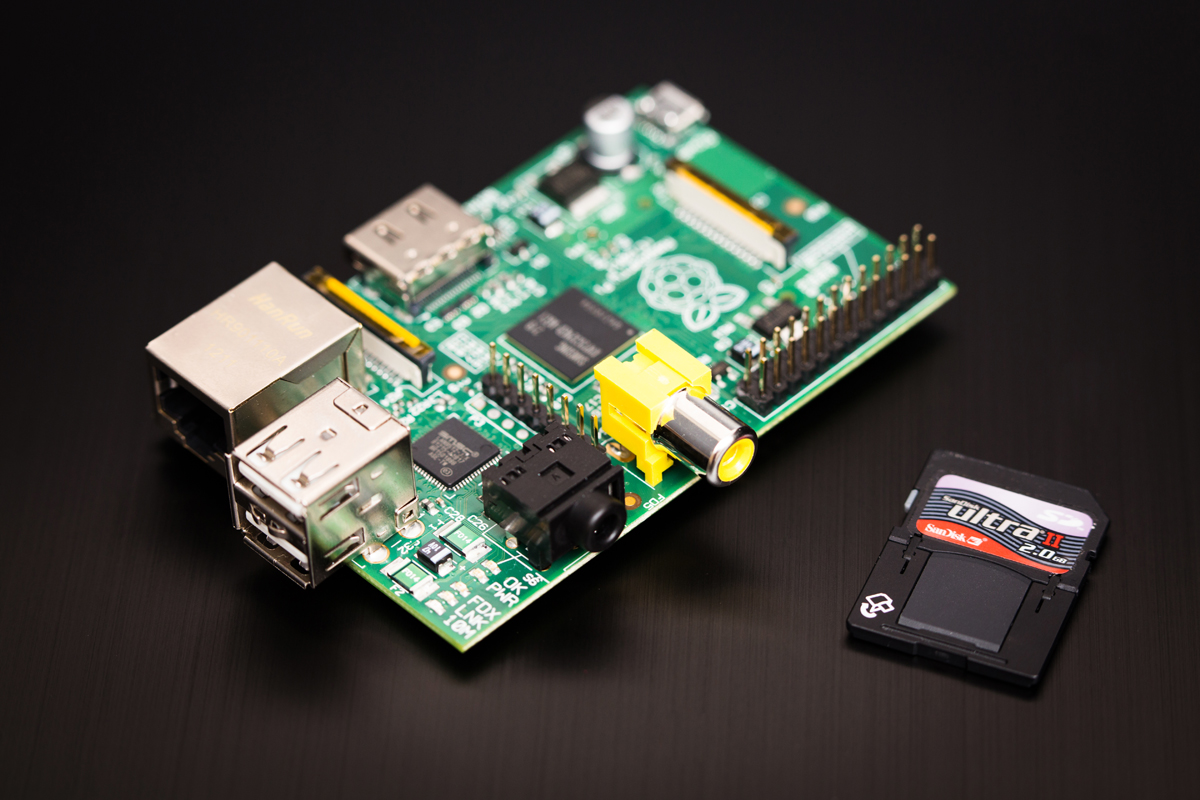
For those that don't know, this is a Raspberry Pi. A $35 ARM based, Linux run computer that is both low powered in energy and specs. But this was perfect for my little project as I wanted the application running all of the time without a power hungry PC having to be on. So as C# was out I falled upon the other language I had a bit of experience in. C++. This proved to be a bit of a challenge as the last time I used the language was in University and turns out I've been a bit spoiled by the niceties of C#.

I finished building the application about a week ago on a Windows environment, and the last week has been trying to get the application running on another friend's Raspberry Pi. It was hard. But this was due to a mixture of my Windows compilier (MinGW) compiling things a little differently to linux's default compiler (G++) and my lack of knowledge when using Linux itself. But it works as I intended. However this is not the end as some missing features need to be added that will make using the service more useable. A task it seems for the weeks ahead.

Saturday, 30 June 2012

Been A Bit Quiet Lately...


Wow...two weeks have passed and this blog has been awfully quiet. Well, that's because the combination of work and Dream.Build.Play took quite a lot out of me, so I decided to take a bit of time off. Played a few games here and there and tried to forget about Do You Know. But I find it very hard to unwind and forget about projects, so it wasn't too long before I was back working on it.

I started off by compiling a list of what I wanted to get done before I put the game into it's first playtest. This list consisted of mainly items I wanted to get done before I submitted to DBP and a few extras I thought would be nice. At the time of writing I've managed to get most of the list done, but in my opinion the game is still too rough to put into playtest. So my plan of putting it in at the end of the month (i.e. today) is not going to happen. But I will divulge some of the new features that have made it into the game.

The first as you can see is that the podiums now show the answer the players have decided on. This is how I'm going to convey the selected answers to the players. This is a feature that I wanted to include in my DBP submission, but as time slipped by this seemed like a very risky thing to implement. In the end though, through some in my opinion trickery, this didn't take too long to implement. To avoid cheating I've also included a spinning question mark which is displayed when a player answers, but is waiting for either time to run out or all other players to answer. This new feature is also complimented by the host speaking when getting to the point where the answers are shown. I however am not sure if this is done too much. I guess that first playtest will answer that ;)

I've also managed to implement the clapping animation into my audience members, which means no longer do I have an applause sound effect playing with no source of where it is coming from. Yes, I did submit this "feature" into my DBP submission. I've set it up so I can make them applaud on the fly, which I will hopefully be incorporating into gameplay in the future. For instance, when a player answers correctly, the camera cutting away to the audience clapping.

The past couple of weeks has also led me to finally installing some form of version control and automated back up on my computer. For version control I went with the Mercurial/HGTortoise combo and set up repos on an external hard drive. The main reason for this was because I use it on a daily basis at work so I am instantly familiar with it. But it couldn't have gone any better as the installation was simple and I was version controlled within minutes. I don't know why I hadn't done this sooner. Perhaps my initial commit message wouldn't have been so big if I had :p

For automated back up I was recommended CrashPlan by a work colleague. This tool allows you to schedule how often to backup and where to do it, with options including folders elsewhere on the oomputer (what's the point), other peoples computers or to their online servers (for a small fee). It also provides backup summaries by email if you so wish and will also send alerts if you data hasn't been backed up for whatever reason. This is all well and good, but the one place it doesn't support backup to is a networked drive, which means I can't stick my backup drive on my network. Boo!

So that's what has been happening. I hope to get some more done in the coming weeks that will give the game more polish and get that first playtest into action. I'm now off to do some "research"...

Saturday, 16 June 2012

Dream.Build.Play: Could It Have Gone Better?


It's been a few days since Dream.Build.Play closed its doors but not before I had submitted by entry, Do You Know?. While the game might not be finished and ready for launch, Dream.Build.Play marked an important milestone, one of which was that after three years of working with XNA I actually submitted something to the competition. Is it a winner? Well, I'm a realist and based on the other entries in my category I'm going to say no. Hell, before the last day I was hoping to be a top 20 finalist, but now I'm fairly confident even this is out of my reach. But where did my entry go wrong or rather where could it have been better?

I Knew What I Wanted...More Time
From the start of the project I outlined everything I wanted from my game. Not the game as it was submitted, but the game as it will hopefully be when I finally release it to market. From this list I tried to outline what features would be able to capture the essence of the game, while still being realistic about what I could include within the competition timeframe. Unfortunately due to certain circumstances, some unforeseen, I started running out of time and features got cut. For instance, at the start of the competition I wanted to include online functionality. The game has been built with this in mind and the single console experience I submitted is built using a local network session. However because I hadn't been able to test the online portion (mainly because my PC build would refuse to create a session), I removed the menu for this feature from the submission. However, possibly this was a blessing as it freed up more time for the polish phase at the end.

Testing - The Wrong Way
Testing was pretty much non-existent, mainly because in addition to programming up my list I was subjected to feature creep. I was testing the game in small parts, pretty much as I coded up each feature on my list, but it wasn't until a couple of weeks before that I tested it as a whole. That was a mistake! As at some point during the process I broke my packet logic which lead me to debugging for a couple of days. This process also led to a few bugs slipping through the net that I had realised were present when I went to bed the night of the competition closing. However I believe these bugs are edge cases and therefore the judges shouldn't end up in situations that will cause them to happen.

I also had planned to do a an AppHub playtest for the game to get some feedback from the gaming community. Unfortunately I never got to a stage where I was confident for an outsider to see the game, which lead me to resort my girlfriend's opinion when she ran through it. Well that was after she had stopped laughing over my voice overs in the game. Once she had, her feedback also led to more feature creep. Some of which was on the day I was submitting my entry. This has definitely brought home how important playtests are. It brought to my attention how important features that I personally had written off because I deemed them as unnecessary, but actually prevented players from being confused. This realisation has led me to aim for a playtest for the end of the month, so stay tuned developers.

Key Features Not Obvious Enough
I had written down a few key features that I wanted my game to include based on limitations I have found with existing trivia titles. I want a wide selection of questions. I want those questions to appear differently in some way every time they appear in the game. I want the presentation of the game to be different every time the users play the game to keep it fresh (there's that word again). While the core concepts of these features were included in the game, the data that drives them were not. This means that to the untrained eye (i.e. the judges), these features do not exist. For instance, a lot of the questions I was going to include in the submission got cut in the worry that I would be subjected to one of Dream.Build.Play's rules; 2.c.vi. In reality I don't think my questions fell into this rule, but at the same time I didn't want my entry to be disqualified over something that could have been avoided. This resulted in my game not having much of question databank, which sucks.

A Different Kind Of Submission
Microsoft guide you through the submission process so that anyone who tries to submit something can. So what possibly could have gone wrong here? Well, apart from the quite frequent server errors during the upload process there was also a section to upload media that showcased your game. Screenshots were easy with XNA Device Center's ability to take screenshots straight from the console. This resulted in me picking images that represented that actual gameplay as best as I could through a static image and without using a single screenshot of my menu system :p However the problem came with the video representation that was submitted. After looking at a lot of the videos associated with a lot of the submissions I'm fairly confident my video was unique...but not in a good way.

At the present time I have no way of capturing gameplay footage of my game through the Xbox, and because my game relies quite heavily on avatars, PC footage was out of the question. This led to my video entry being a slideshow representation. This is so disheartening after the amount of effort I've put into the game so far. It's so disheartening that I have not made my video publically listed because I don't want the first thing gamers to see of my game being a slideshow.

...Not As Bad As I Thought
After pin pointing the problems with my submission a lot of the problems all come down to one thing...time. This is not surprising for a competition and the chosen circumstances I had decided to work against. If I had more time a lot of these problems could have been avoided and my submission would have been that bit more stronger. But this is just one of many milestones for my games development and as long as I learn from my mistakes I will win when it matters most...when my game hits the marketplace.