Friday, 6 April 2018

Alexa, Open South Gloucestershire Bin Day


Another month, another Alexa skill that I've released to the wild. This was the skill that I teased back in Janurary on Twitter as the "useful" skill. The skill started off life with my main goal of retrieving information on my next bin collection as I kept forgetting what was being picked up each week (recycling, garden waste, non-recyclables). The skills available on the store were either for specific councils (not mine), or required me to set up the information my self. The problem with the latter is I'd be getting the wrong information if it ever changed without me knowing. I wanted to get the data straight from the source.

Luckily, my local council is South Gloucestershire and they are helpful enough to have the information available on their site (like most councils). Even better though their site seems to follow modern practices separating their services from their presentation layer, which meant I could use the same private APIs to retrieve the bin information. This meant that I could ask the council directly for this information and I developed this part of the skill quite early on. So why has it taken until now to release it?

Well, not content with just doing my council, I wanted to investigate if I could support other councils as well. I found a delightful API called api.postcodes.io, which allowed me to query the council that a given postcode was under. This was perfect for me to determine which council I had to query for the bin information for a given user. However, this is where my plans fell apart.

I started by looking at the number of councils available in England alone on Wikipedia. Turns out, there's a lot! So I decided to focus on the councils that served the most people and therefore my skill would be helpful to the most people. Unfortunately not all council websites are created equally and retrieving bin information are not designed as nicely as South Gloucestershire. Most of them are ASP based with server side rendering, which would mean that I would have to parse the website source code to get the information I needed. The result of this was fragile logic which could break if the website ever changed. In addition, the time it was taking me to get a single council up and running was taking ages with no guarantee it wouldn't suddenly break.

I'm surprised (and not surprised) with how different each council's website is structured, despite providing very similar information. I wish our government would have a common approach across councils as this make my life easier. Better yet would be a centralised service that provided common council information as this could save costs in the long run if there was just one set of services they'd have to maintain.

But back to the point of this post. If like me your local council (and number 50 on the list) is South Gloucestershire, you can grab my new skill from the Amazon store. If you do enable it, please don't forget to leave a review :)

Saturday, 23 December 2017

Alexa, Open Bus Timetable


Over the past few years many of the big players have been pushing their own AI assistants. Cortana, Google Assistant, Alexa, Siri and more coming out every year. Recently, I've taken an interest in these different assistants, seeing how they tick and evaluating the similarities and differences. I see these as becoming the primary interaction for certain (but not every) day-to-day tasks that we may do now with other devices. For instance, last year I looked at asking Cortana for the latest temperature recorded by my Point devices.

Recently, I've obtained an Echo Dot as the price was just too low to pass up on. I'm impressed with it, and in the Kitchen, Alexa is very helpful when my hands are full. However, there was one piece of information she just couldn't provide to me out of the box.

I catch the bus a lot, but have just recently moved so haven't got used to the bus times. Alexa doesn't know this information out of the box, so I went looking for an existing skill to fill this void. Unfortunately, I failed to find one that either worked in my city (there's a lot that work in just London), or were natural/easy to use without having to know the stops I'm wanting to depart from. So I saw this limitation as an opportunity to expand my knowledge with the Alexa Skill framework and developed a skill where I could ask it more natural questions for finding out bus times.

But not wanting to limit this skill to just myself, I've soft launched it in the UK (with more countries to hopefully follow in the future) and so it's now available in the Amazon Skill Store. It would be great if you could try it out, provide feedback and rate it in the store :)

Friday, 2 June 2017

Reminders in Microsoft Teams using Flow

Following on from my previous post, I thought I'd do another "solution" to a feature missing from Microsoft Teams that I used in Slack. Reminders.

In Slack, it was possible to set reminders within channels which Slack would remind you (or the channel) about at a given time. These reminders could be as simple as "remind @channel at 1pm to go to the meeting" or as complex as "remind @channel at 9am every weekday to go to standup".

This feature is unfortunately missing from Teams, with no bots available to fill the gap and nothing but a feature request to hold our breath on.

While we wait however, we can use Microsoft Flow to fill the gap.

(NOTE: There is currently a limitation with this guide around handles. Handles are currently not expanded when received by Teams, which means users belonging to that handle will not get notified. This is currently being worked on)

This tutorial will look into setting up a reminder; both simple and complicated. I'll be assuming that you know the basics of creating a flow, so lets get started by logging into Flow and select "Create from blank".

Setting up when our reminder goes off

Our flow will start off by setting up our schedule. This is achieved via the Schedule - Recurrence trigger. From here we setup our Frequency and Interval, which will be used to determine how often you want the reminder to go off. For instance, if you wanted the reminder to go off once a week, then you would set the Frequency to "Day" and Interval to "7" (i.e. every 7 days). In order to determine the day/time in which the reminder will go off, we'll need to look at the advanced options.


From here, we can setup a start date from when the reminder should start. This will also be the point in which our interval will initially be counted from. So if we wanted to have our reminder go off every Friday at 1pm, then our Start Time would be set to "2017-06-02T14:00:00". Note that you should adjust this to a date that falls on a Friday in the future, or the flow will never trigger :) You'll also want to setup a time zone to ensure it triggers based on your local time. For me, this is GMT (or UTC+0). Your trigger should look like the following.

Expanding our reminder

Our recurrence is fine if you want your reminder going off once a week or every day, but what if you wanted something more complicated? Something like our example where we want it every week day. In Flow, this is achieved via conditions.

To achieve this we'll need two conditions to make sure the day of the reminder is between Monday and Friday, which will need to be entered in advanced mode. The first condition should look like the following.

@greater(dayOfWeek(utcnow()), 0)

This condition is passing the current date/time into a function which returns the day of the week in the form of a number. 0 is Sunday, 1 is Monday all the way to Saturday which is 6. We are wanting this number to be greater than zero (Sunday), therefore starting on Monday.

From this condition, we'll then want to setup a second condition if the first condition is true/yes. This should look like

@less(dayofweek(utcnow()), 6)

This condition is similar to our first, but we want to make sure our day is less than 6 (representing Saturday), therefore ending on Friday. From here, all further actions will need to be added to the yes section of our conditions. The flow should look like the following:

Creating our reminder message

Once our Flow trigger goes off (and our conditions, if set up, are met), we'll want to compose our message to send a nicely formatted message to Teams. This can be done by adding an action following on from our trigger called Data Operations - Compose. Within the input field, we can then compose the message we want to send. This can include any supported markdown to create a formatted message (e.g. bold text).
In the example below, we're going to be posting "Stand up" in bold text

Sending To Microsoft Teams

The last part is to send our message to our desired channel within Teams. At the time of writing, Flow includes Teams integration directly, but there are two main problems that I have found when using it
  1. When Flow posts the data to Teams, it is posted on behalf of your account. This just looks odd to other users and I'm not sure if you'll get notifications when Flow posts on your behalf.
  2. The Teams integration doesn't support markdown for some reason. As this is still in preview, this will probably be fixed before final release.
Because of these problems, we're going to send our data to an incoming web hook made in Teams. Therefore, go to Teams and setup an incoming webhook. I like to give it a bit of style and therefore I've called it Flow Reminder with an alarm icon to make it stand out when posting.


Once done, copy the URL provided with the incoming web hook; we'll need this later on. In Flow, add a final action using HTTP - HTTP. The URI field should be set to the URL generated by the Team's incoming web hook. The rest of the action should look like the following:


As you can see, we're using Dynamic Content with our body. Dynamic Content are pieces of data that are generated as our Flow progresses and is based upon our previous triggers and actions and can be used in conjunction with fixed text. These are available in an overlay to the right of the action. They're added simply by tapping the relevant label.

Once complete give the Flow a name and save it. It's now ready to start sending you reminders in Teams. If you can't wait for the time to arrive, you can always run it manually.

Tuesday, 23 May 2017

Richer Web Hooks With Microsoft Flow

I have recently started working with Microsoft Teams. Like other communication platforms, third party integrations make the platform ever more powerful. One integration I wanted was to alert members of the project I was working on when new builds were published to HockeyApp. With Slack, the integration was simple and produced an informative result within the target channels.

With Teams however, while simple to setup, the produced result is less than informative.


As you can see, less than seller. But not surprising, as Teams doesn't know how to interpret and display generic web hooks, as they all come in different shapes and sizes. Microsoft expects third parties to create custom connectors. Microsoft's next generation of HockeyApp (Mobile Center) has a connector on the roadmap, but nothing is expected to be done with HockeyApp.

To solve this problem, we need an intermediate interpreter that can take the content of our web hook and translate it into something that Microsoft Teams can understand and display. This can be achieved with a tool like Microsoft Flow and can be split down into three stages
  • Accept the contents of the incoming web hook
  • Translate
  • Send to Microsoft Teams
This tutorial will look into translating our HockeyApp web hook, but can be adapted to work for any service that supports web hooks. I'll be assuming that you know the basics of creating a flow, so lets get started by logging into Flow and select "Create from blank".

Setting up an Incoming web hook

First thing we need to do is set up an end point within Flow that HockeyApp can post our web hook notification to. Within the Triggers section, look for the trigger Request/Response - Request.

Once we've selected this trigger, we will need to tell Flow how to interpret the results so that it can use them later on in the flow. This can be done either by uploading a schema or by uploading an example response. For HockeyApp, we can get an example of the payload from their web hook tutorial, where we'll be using the payload of Version Released. Once uploaded, our result should look like the following.

An incoming web hook URL wont be generated until we've saved our flow, so we'll come back to this at the end.

Translating

Once Flow has received our incoming web hook, we'll want to translate the results into a nicely formatted message to send to Teams. This can be done by adding an action following on from our trigger called Data Operations - Compose. Within the input field, we can then format our web hook input into something more informative using the provided data. We do this by adding Dynamic Content to our input, which is available as an overlay to the right of the action. These variables are generated from our trigger's schema and can be used in conjunction with fixed text. They're added simply by tapping the relevant variable.

As our input will be used within Teams, our input will use markdown to stylise the content. I'm needing just the title, version and notes from HockeyApp, but you can include anything that is available to you. Our result should now look something like the follow.

Sending To Microsoft Teams

The final part of the puzzle is to send our formatted data to our desired channel within Teams. At the time of writing, Flow includes Teams integration directly, but there are two main problems that I have found when using it
  1. When Flow posts the data to Teams, it is posted on behalf of your account. This just looks odd to other users and I'm not sure if you'll get notifications when Flow posts on your behalf.
  2. The Teams integration doesn't support markdown for some reason. As this is still in preview, this will probably be fixed before final release.
Because of these problems, we're going to send our data to an incoming web hook made in Teams. Therefore, go to Teams and setup an incoming webhook. I like to give it a bit of style and therefore call it HockeyApp with the official logo to make it look official when posting.


Once done, copy the URL provided with the incoming webhook; we'll need this later on. In Flow, add a final action using HTTP - HTTP. The URI field should be set to the URL generated by the Team's incoming webhook. The rest of the action should look like the following:


As you can see, we're using Dynamic Content with our body, this time pointing at our generated payload from the translating stage to determine the content to send.

Finally give the Flow a name and save it.

Final Setup

So we have our flow, but now we need to configure our service, HockeyApp, to send data to it to start the flow off. Open up the Flow we've just created and select the first trigger. Now that our Flow has been saved, a URL should be generated within the HTTP POST URL field. Click the nice copy icon to copy it to your clipboard.

Once the endpoint URL has been copied, navigate to your service and setup the webhook. For HockeyApp, this can be done by following their tutorial, using the Flow URL as the target.

To test, you will either need to upload a new version to HockeyApp or use a tool like Postman to send an example payload to the URL generated by the flow. When you do either of these, you should see the new message pop up in Teams.


Friday, 14 April 2017

Goodbye from Pix Casa

Hello fellow Pix Casa users!

I have decided that I will be ending support for Pix Casa and taking it off the marketplace. The app should still be "usable" for those of you that are currently using it for the time being, but no new users will be able to download it. I will no longer be providing updates or assist with any issues that are caused by the application. I suggest that you find alternative methods for viewing and backing up your photos.

This decision comes as the automatic backups have been less stable than they once were, and other users are also reporting similar issues. Without this key feature along with the reduced functionality of the app due to Google retiring Picasa, I don't see the same value the app once provided.

Thank you for supporting the app over the last two and a half years, which outperformed my initial expectations. I hope to see similar support for my current and any future projects I may release.

Monday, 12 September 2016

My Daily Wallpaper v1.1 Out Now

 A new update has been released for My Daily Wallpaper bringing it up to v1.1. The aim of this update was to improve the experience of the initial release, as well as pave the way for new features coming in the future. New stuff includes:
  • New Source Settings - XKCD source now supports retrieving random comics. This means you can now have  different XKCD goodness every day of the week. Perhaps even make My Daily Wallpaper an XKCD app? Bing source now also supports downloading HD versions of wallpapers on mobile (and SD versions on desktop).
  • Live Tile Support! - My Daily Wallpaper now displays the last seven days worth of wallpapers straight on your start menu or start screen. This works in similar way to the native photos app.
  • Dislike - Dislike today's wallpaper from within the app. It doesn't do much at the moment other than give you tips, but I plan to do more with this in a future update
  • Change Is Good - When changing today's wallpaper source or source settings, you no longer have to wait to the following week to see those settings applied and instead can apply them then and there.
  • Updates To How Wallpapers Are Set - XKCD comic now has a reduced brightness when applied as a wallpaper to help make other text more readable. Improvements have also been made to how wallpapers are set in the background, which means it should be more reliable. 
Now that this update is out of the way I plan to start work on some new sources for the app as well as flesh out the dislike functionality to be more useful.

EDIT: If you have any ideas for future functionality you're wanting to see, I'd love to hear about it via appstretch.

Sunday, 14 August 2016

UnauthorizedAccessException when deleting local files

While coding the first update for My Daily Wallpaper, I wanted to tackle some of the bugs reported by my users. According to the Windows Dev Dashboard, the top bug (by a long shot) was an UnauthorizedAccessException. Based on the logs this exception was caused by the wallpaper manager, which handles the downloading and setting of wallpapers based on user settings, where it would attempt to delete the old wallpaper.

foreach (StorageFile file in files)
{
    if (file.Name.StartsWith(LockscreenManager.OriginalFilenamePrefix, StringComparison.OrdinalIgnoreCase))
    {
        await file.DeleteAsync();
    }
}

The odd thing was, this error didn't occur all of the time and didn't have any clues as to why it did happen when it did.

I was stumped.

So I honed my Google-fu and managed to stumble upon a MS forum post which sounded a lot like mine.

It turns out, that when you reference a local file via the Image control in xaml, a lock is put on the file.

<Image source="Path/To/Local/File" />

This lock doesn't even seem to be taken off for while after navigating away from the page that includes said Image control.

The result - an UnauthorizedAccessException when attempting to delete the local file.

My solution to this problem is to use a converter to create the Source for the Image control by getting the file stream and loading it into a BitmapImage.

public class ImageSourceConverter : IValueConverter
{
    public object Convert(object value, Type targetType, object parameter, string language)
    {
        string path = value as string;

        if (String.IsNullOrEmpty(path) == false)
        {
            var storageFile = StorageFile.GetFileFromPathAsync(path).AsTask().Result;

            var imageStream = storageFile.OpenStreamForReadAsync().Result;

            BitmapImage imgSource = new BitmapImage();

            imgSource.SetSource(imageStream.AsRandomAccessStream());

            return imgSource;
        }

        return null;
    }

    public object ConvertBack(object value, Type targetType, object parameter, string language)
    {
        throw new NotImplementedException();
    }
}

Wednesday, 6 July 2016

Picasa Photo Hub v2.1 : A New Update With A New Name

I've just released a new update for Picasa Photo Hub, bringing the app to version 2.1. This update was meant to be a small update to fix the notifications raised by Picasa Photo Hub that resulted in app crashes.

Unfortunately, Microsoft decided again that it didn't like the name of my app. After attempting several times to submit the update and contacting Microsoft support, I was finally told that the name having Picasa was the problem. This is due to the name being copyrighted by Google. Their naming conventions for app names (from what I can understand) allows you to use copyrighted names, but they can't be the prominent part. Meaning you can have names like "Client for Picasa", but not "Picasa Client". After a few days of brainstorming I decided on the new name of Pix Casa. Hopefully I won't be hit by the certification team again.

While I was waiting for the response on why the app was failing certification, I thought I would make the app a bit more meaty and add a feature that several users were asking for that was omitted in the transition to Windows 10. You can now once again save photos to your local device and share them with other installed apps. Why wasn't this in the original update? Originally, this was not provided by my app but instead the native photo app. So when I was doing the update, I didn't have any code that prompted me of these missing features. Maybe a good example of some needed BDD?

The app also now features in app notifications about updates from myself relating to the app. You may have even made your way to this post from these notifications :) Like with search, this new feature is only available in the Windows 10 version of the app.

Now that this update has been released, an update for My Daily Wallpaper is in the works...

Monday, 27 June 2016

My Daily Wallpaper Is Officially Out

If you haven't been following my twitter or popular news sites, then you might not have realised that I've released a new application for Windows 10 desktop and mobile. My Daily Wallpaper is out this very moment and you can download it too.

The app has had on and off development for over a year, and started off as both a solution to a first world problem and a proof of concept for a component I was developing for changing a users lockscreen that I could drop into other applications. The first world problem I had was that I kept missing XKCD comics, and so thought that if I had them automatically download onto my lockscreen I'd be able to either see (or at least be reminded of) the latest XKCD comic. The only problem was that there are 7 days in the week and only 3 XKCD comics a week. So the app evolved into including more than just XKCD and into the app that is available today.

The app was also fortunate enough to be picked for Junes AdDuplex HERO APPS program, where it was awarded the highest level. This resulted in their twitter account tweeting about the app and a review by Windows Central! They didn't mention my name, but it was more than Picasa Photo Hub ever got :) This saw a significant download boost for the app, which is somewhat niche in nature, so if your app is eligible I definitely advise you at least submit it for the program.

Unfortunately, timing was not on my side as at the time of release the current preview build of Windows Mobile 10 stopped the app from setting the wallpaper - the main function of the app. This has crippled its ratings by frustrated users (and rightfully so), which are only just moving back to positive. This was also something that was beyond my control, so I just had to sit back and watch the outcries. I submitted an emergency update to at least let the users get past the first time use setup, but that was the most I could do.

Now the app is out I'm currently working on a few things for future updates
 - New sources - the initial 4 are a bit limiting
 - Deeper configuration for how the wallpapers are set automatically
 - Bug fixes reported by users

However, this is currently taking a back seat on some bug fixes for Picasa Photo Hub - more on that soon.

So go out, download the app and spread the word via twitter or AppRaisin

Friday, 27 May 2016

Picasa Photo Hub for Windows 10 Is Finally Out


After months of gruelling work, Picasa Photo Hub is now ready and released for Windows 10 Desktop and Mobile!

This has taken a long time as while the last update for Picasa Photo Hub laid the ground work for this upgrade, the UI has been re-written from the ground up. This means that the Windows 10 version of the app now includes:

- Viewing photos and albums from within the app itself
- Sharing photos manually makes use of the background transfer service so you don't have to wait around for them to be uploaded.
- Drag and Drop photos into the app to start uploading them into your collection (Desktop Only)
- Search your photos within the app like you can on other platforms. Try searching for "food" and see what photos come up :)

But unfortunately, with this update some features are going away. Not because I didn't have time to implement them, but because Google have announced that they are retiring the Picasa services in favour of Google Photos. This happened smack bang in the middle of development and I was torn whether to carry on with the update, or to just leave Picasa Photo Hub to die. I decided that even though the service was being retired, what I was learning during development could be used in future applications. I also felt like the users of the app deserved it to work as well as possible on Windows 10. This announcement is also the reason why the UI for the Windows Phone 8.1 version has remained untouched, and will largely be the same app you already know.

However, along with Google's announcement, they have also removed the following features which have been reflected in the application:

- Commenting on photos
- Replacing photos
- Deleting Photos

So what does the future hold for Picasa Photo Hub? If a public way for interacting with Google Photos arrives, which could happen with I/O development conference just around the corner, then the app may evolve into a Google Photos application. But for now, I have decided that development on Picasa Photo Hub will be limited to bug fixes going forward.

It's been a great ride for the app, and who knows, the application may live on in some form in the future...

Thursday, 11 June 2015

For The Future: Picasa Photo Hub Update Out Now


Well, it's been a long time coming, but I've finally done it. I've hit the publish button and Picasa Photo Hub should be updating on your phone soon.

As mentioned in my previous post, I've been spending the last couple of months upgrading Picasa Photo Hub in preparation for where development on Windows is heading. It look a lot longer than anticipated, but I feel it's been worth it. I feel a little better with the shape the code is in, but more stuff needs to be done. But those changes can wait for the moment.

The main objective of this update was to migrate how background backups were managed within the application, from an old mechanism that's no longer supported (LINQ to SQL) to a mechanism that's more widely supported (SQLite). However, I wanted to achieve this while preserving your data which meant I needed an update that contained both the old existing mechanism (LINQ to SQL) and the new mechanism (SQLite) and provide a way to migrate the data.

I'm happy to confirm that this is in place :) Which means the first time you run the application or when a background backup occurs, your data will be migrated. If the first scenario is encountered, you will be greeted with the below screen.


This shouldn't take too long to complete. If you don't see this screen don't worry, it's probably just done the process in the background.

But that's not all! I also managed to squeeze the following additions in the update:
  • Re-written backup engine - This has been built from the ground up in a more re-usable form. From a Picasa Photo Hub perspective, this hopefully means you'll get less errors (both in backups and the requesting of sending error logs). From a more general perspective, it means I could provide the same backup features for other services in new apps...
  • Replace functionality - As teased in the last update, for all of you people who like to edit your photos and add filters, touch ups, etc, you can now replace the content of any photo that can be viewed within the photo hub. This means while I don't provide out of the box photo editing features, you can use one of the many apps available on Windows Phone and then upload the results via Picasa Photo Hub.
  • New logging in mechanism - As part of the migration, I'm using a more standard\secure Windows Phone ability to log you into your Picasa account. I've also updated how your authenticated details are stored. This unfortunately means that you'll need to log into the application again once you receive the update. You'll get a notification to do this if you forget :)
  • Higher Resolution Photos in Photo app - I've improved the resolution that photos are downloaded at when accessed via the photo hub. This should have happened all along, but due to a bug in the Photo app these were never downloaded. Hopefully this will improve your experience.
  • Updated rating prompt - I've heard your cries that this is too aggressive. It was never meant to be, and for that I'm sorry. I've increased the time before you'll see this.
  • Slight UI Changes - I've made some subtle changes to the UI mainly in the font to be more subtle and updated the image size selector to be hopefully more pleasing to see and use.
I hope you enjoy the update. If you have any comments, don't forget to email or tweet me or leave a comment below.

In the mean time, I'm going to take a little breather then start working on some new features for the application. Hopefully the next update won't take so long :)

Monday, 16 March 2015

Picasa Photo Hub Update

Thought it was about time for another Picasa Photo Hub update!

The upgrading in preparation for the next Windows is coming along nicely. I've upgraded most of it so that it's now using my unified portable library, along with using portable class libraries within the application itself as much as possible. This means that when the time comes to upgrade it to use all of the nice new unannounced features of Windows 10, the upgrade will be easier. It also means I don't have to maintain two internal libraries for my apps (one for Silverlight and one "Universal" apps).

This upgrade is also necessary to ensure that all of your personal data is kept in tact when the upgrade happens, as it's using some technology that has been basically deprecated (LINQ to SQL). In doing the upgrade however, I've managed to get a dormant feature working which will help with all of you guys that love tweaking your photos...


In the meantime though, I thought I would release an update to tide you over until then. This update fixes some errors reported by you as well as adding some extra debugging information to try and fix some of the other issues. They include:
  • Updated background task to check if the user is authenticated, and report issue to user if they're not.
  • Updated error logging of album picker to provide more information.
  • Made enhancements to improve background resizing of images.
  • Fixed issue where background task wasn't getting rescheduled.
  • Fixed issue where pending upload page wasn't displaying items when navigated from toast.
  • Fixed misc reported defects.
The update is live now, so grab it while it's hot!

Friday, 6 February 2015

Picasa Hub + Backup Update 1.1.3 Out Now


Another month, another update to Picasa Hub + Backup. While only a small update, fixes include:
  • Fix to the background backup facility which caused it to get stuck in certain situations.
  • UI fix which prevents users from having their albums sorted in creation descending order
  • Fixed issue that prevented users from manually uploading a picture from the "View Pending Uploads" page - I'm very sorry this has been present for so long. Took a while to realise what was the problem but thank you to everyone who sent error logs.

You might also notice that the application has had a change of name to Picasa Photo Hub. Don't worry, I haven't dropped the back up facility.

Unfortunately, Microsoft insisted on me updating the name of the application because the metadata data didn't "represent its source, functionality, or features". After contacting Microsoft about this vague failure, they pointed me to the app naming section of a blog post that someone had posted 3 months before the first version of my application even hit the store. Turns out, I wasn't the only victim of this either. Unlike them however, I fought and lost with a name that had as little departure as possible. But, for now, they're happy with the new name. All I can say is, I think for a company that is struggling to keep developers, things like this don't help. I would understand the failure if the application was new, but as it had been on the store for ~5 months with an average rating of just under 4 stars, I don't think people had a problem with the name. Hopefully with the next update I won't get this problem again.

Speaking of the next update, I'm about to start the next update which will include some more bug fixes, along with some plumbing work in preparation for the future of the application and platform. Hopefully this update will be out by the beginning of march.

In addition, to keep my creative juices flowing, I'm also currently working on some new applications, some of which I'll hopefully be able to share in the future...

Tuesday, 16 December 2014

Picasa Hub + Backup 1.1.0 Out Now

If you have downloaded my Picasa Hub + Backup application, then you'll would have hopefully received the 1.1.0 update for the application. If not, then visit the application store page on your phone and click the "Update" button. This update fixes a lot of reported bugs by users, as well as improving the Picasa experience. An overview of the update includes:
  • Added ability to delete an image from your Picasa account when vieing an image within the application
  • Added ability to see your Picasa account storage availability via the settings page.
  • Fixed rating prompt to be less aggressive
  • Fixed photo hub integration to download high resolution version of images
  • and much more...
For more information, you can see the full change log by launching the application, going to the "About" section on the settings page and clicking the latest version.


I hope you enjoy the new features the application brings, and if you have any suggestions on what future releases could bring, please don't hestiate to contact me via the app or post a comment below.

Sunday, 31 August 2014

Picasa Hub + Backup Now Available

Well I've done it. If you're a long time reader of this blog, you may have noticed that I have had tendencies to start projects without ever finishing them. Sometimes due to the size of the project being far to big for me, or because the concept has never panned out. And sometimes, the project never had the intention of being released in the first place.

Well today, I've reached a new milestone. My app, Picasa Hub + Backup, has now been released to the masses for the low low price of FREE. If you are an active Picasa user, or have just come over from competing platforms, then Picasa Hub + Backup should provide you with everything you need to keep enjoying the service. At the moment the application is ad-supported to (hopefully) help pay for my Windows Phone Store membership, but there will be an option in the near future to remove ads for a small price in select countries.

If you're a member of the press and I have failed to contact you, please download the press-kit from the website and let me know if you write a review (good or bad). And of course, everyone should go out and download it now for FREE.

So what's next? Well I will be working on a new app, which will hopefully be released a lot sooner, along with an update to Picasa Hub + Backup to bring new features (which may be related to the new app).

So go download Picasa Hub + Backup, tell your friends and family and write positive reviews...

Saturday, 21 June 2014

Picasa Hub + Backup - Update 2

Once I released the beta of the first version of Picasa Hub + Backup, I started work on the next update. As teased in the previous post, I was working on the following features:
  • View and add comments for a photo
  • Configure your target album for your backups and shared photos
  • Configurable ordering of photos albums in photo hub.
As you can see below, these features were successfully added into the update:


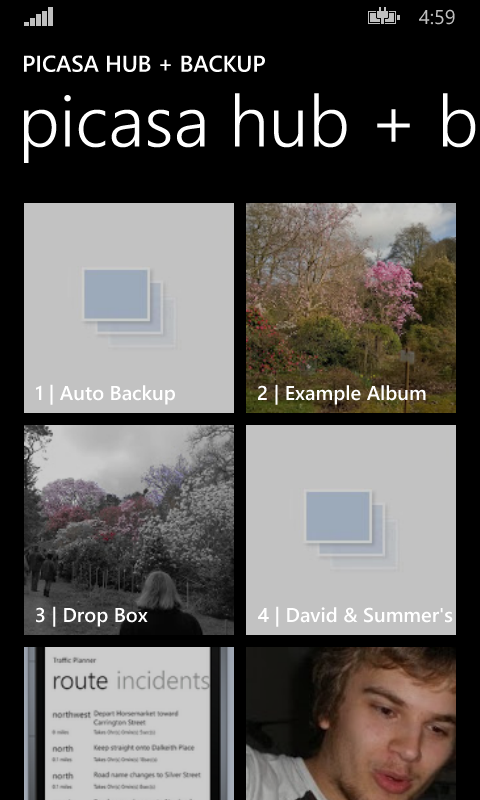
Unfortunately, the feature that allowed the user to select the order in which albums were ordered when viewed within the photo hub resulted in me having to get a little creative. The API that Microsoft have provided only allows the albums to be displayed in ascending order of title. This proves to be problematic if you want your most recent albums first as there's no way of doing this.

To accomplish this, I looked into ordering my albums and then prefixing the titles within the photo hub to have a set number of non-printable characters that came before the standard alphabet. My thinking was that the sorting would take these characters into account and would force the albums into a given order while preserving the original album name, due to the ascii version of the non-printable characters coming before the standard alphabet. However, this resulted in the entire album name not being rendered. In the end I resulted in prefixing the titles with numeric values (as seen in the screenshot above). It's not brilliant, but at least the photo hub is more usable. I just wish the photo hub itself was updated to support sorting of different criteria.

I also updated my "about" screen so that it includes an inbuilt change log which is downloaded from a remote source. My intention is that users can then see easily when updates are available (if they're not updating automatically) and see what features (and possible bug fixes) are awaiting them in the update.

I also encountered a lovely issue with the certification process when I released this new update to the marketplace. The build worked on both the emulators and devices I had tested, passed certification but failed to install when downloaded from the store. The culprit? A reference to the splashscreen file which didn't exist within the resources in one of the manifest files. Hopefully Microsoft will catch this issue in an update to the certification process or an update when deploying packages locally in the near future. That would be very embarrassing had it happened on a public listing.

I'm now working on a third (and hopefully) final update before I release the application publically  where I'm investigating (and hopefully implementing):
  • Fixing a bug where web requests aren't returning
  • Backing up files at a reduced resolution so that it falls within the users free allowance
  • Rendering issues with comments
  • Advertisements on select screens (with in app purchase to remove them)
Here's to the next couple of weeks...

Thursday, 29 May 2014

Work In Progress: Picasa Hub + Backup

Recently a colleague of mine switched from Android to Windows Phone. From the switch he jumped straight into the Windows Phone 8.1 preview and has managed to find decent alternatives to the applications he used while on Android. Like many Android users, he used the Picasa services (or Google+ photos as I think it's now known as) to store and backup his pictures, for which he has a backlog of a few years. But he has failed to find a decent Picasa app that satisfies his cravings. This is showcased event more with the introductions of new features in 8.1 that the existing apps haven't embraced like photo hub integration.

This sounded interesting to me and so I've been developing "Picasa Hub + Backup" for the past month.


At first, my main goals were simple:
  • OAuth authentication - No applications on the market appears to offer this
  • Photo Hub Integration - No applications on the market appears to offer this
  • Automatic Backups
  • Share photos from other sources to Picasa service - Other applications appear to be limited to the photo hub as a source for the upload.
These features have been implemented and I've since released a preview\beta of the application which at the moment only has a single participant, my colleague.

I'm now working on a second release which will include:
  • View and add comments for a photo
  • Configure your target album for your backups and shared photos
  • Configurable ordering of photos in photo hub.
If this seems interesting to you, you are on the 8.1 developer preview and you would like to be involved in my preview\beta, then let me know by sending the Microsoft account associated with your windows phone(s) via either twitter (via private message) or via email at apps [@] davidskendall [.] co [.] uk.

Wednesday, 21 August 2013

Form Posts and the BackgroundTransferService


At the time of getting my Windows phone I was the owner of an app membership which at the time allowed me to develop apps for the phone. I wanted to create an app that interacted with a personal file server, which allowed files to be uploaded to it via a form post online. I achieved this by using WebRequest objects, but due to the limitation of Windows phone apps this meant that I had to stay within the app in order to complete the upload, which was not ideal. Then Mango came out and with it the BackgroundTransferService, which allowed uploads and downloads to happen regardless of the state of the app that initiated them. So I set out to upgrade my app to upload the files via this new background service, but couldn't for the life of me to get it to work so I gave up. My app membership then ran out, meaning that I could no longer use the app anyway and the code just became a folder on my computer gathering virtual dust...

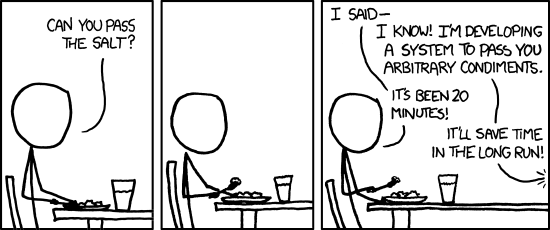
Fast forward to a few weeks ago (strangest statement ever) and Microsoft announce that anyone can develop and deploy up to two apps on any one phone, for free. So, I decided to redesign my application from the ground up and starting by attempting to conquer the BackgroundTransferService once again. I started by googling (or binging, yahooing, asking, etc) my problem to see if anyone had had success in this area as a lot can happen in a few years. No one had. I then manged to find a post detailing MY EXACT PROBLEM. My face lit up. Was my search finally over? I scrolled to the bottom for an answer. No answer. I looked to see who posted it. It was me when I was first having the problem. An example that in the XKCD scenario (shown above), the poster doesn't necessarily know of a solution because I knew nothing.

I decided to attempt once again the solution that the post gave me. I downloaded Fiddler, posted a file using the BackgroundTransferService, posted a file using the web form and examined the result. Not surprisingly, the BackgroundTransferService post was missing a bunch of information that was included in the web form post, and instead was just posting the raw file binary. No boundaries of anything. But why would it? I hadn't told it to. After messing around with the Headers property and about to give up, I had one final idea. One that I thought would never work because I thought it was hacky as hell. What if the stream I stated to upload was in fact the contents that are uploaded via a web form post.

using (IsolatedStorageFileStream stream = storage.CreateFile(@"shared/transfers/" + tb_Filename.Text))
{
    StringBuilder content = new StringBuilder();
    content.AppendLine(String.Format("-----------------------------{0}", boundary));
    content.AppendLine(String.Format("Content-Disposition: form-data; name=\"file\"; filename=\"{0}\"", tb_Filename.Text));
    content.AppendLine(String.Format("Content-Type: image/jpeg"));

    content.AppendLine();

    byte[] contentAsBytes = Encoding.UTF8.GetBytes(content.ToString());
    stream.Write(contentAsBytes, 0, contentAsBytes.Length);

    content.Clear();

    _selectedStream.Position = 0;

    byte[] buffer = new byte[16 * 1024];
    int read;
    while ((read = _selectedStream.Read(buffer, 0, buffer.Length)) > 0)
    {
        stream.Write(buffer, 0, read);
    }

    content.AppendLine();

    content.AppendLine(String.Format("-----------------------------{0}--", boundary));

    contentAsBytes = Encoding.UTF8.GetBytes(content.ToString());
    stream.Write(contentAsBytes, 0, contentAsBytes.Length);
}

BackgroundTransferRequest request = new BackgroundTransferRequest(new Uri(Uri.EscapeUriString(Page_Upload.UploadDestination), UriKind.Absolute));
request.UploadLocation = new Uri(@"shared/transfers/" + tb_Filename.Text, UriKind.RelativeOrAbsolute);
request.Method = "POST";
request.Tag = tb_Filename.Text;
request.TransferPreferences = TransferPreferences.AllowCellularAndBattery;

request.Headers.Add(new KeyValuePair("Content-Type", String.Format("multipart/form-data; boundary=---------------------------{0}", boundary)));
BackgroundTransferService.Add(request);

I selected a file, hit the Upload button and checked my file server. And with much surprise (although looking back I don't see why), the file was there.

So as can be seen, the BackgroundTransferService can used to upload all types of data in all types of form. You just need to know how. Or in my case try everything else.

Update: It appears this blog post may be more helpful if it includes the php code it was interacting with. So here is a stripped down version of it
<?php
 if ($_FILES["file"]["error"] > 0)
 {
  echo "Return Code: " . $_FILES["file"]["error"] . "
";
 }
 else {
  move_uploaded_file($_FILES["file"]["tmp_name"],
           "./" . $_FILES["file"]["name"]);

  echo "Successful";
 }
?>
<form action="upload_file.php" method="POST" enctype="multipart/form-data">
  File: <input type="file" name="file" />

  <input type="submit" value="Submit" />
</form> 

Thursday, 30 August 2012

Side Project: Sms Messaging Service

I love going to the cinema. There's something about watching the latest blockbuster (or sometimes in my case the latest flop) on a big screen in seats you would never dream of buying for your home with a cup of fizzy that is incredibly overpriced. OK, so maybe that last part I'm not so fond of. But still, the cinema is great. It's even better in the UK if you own a mobile on the Orange network as you can get 2 for 1 tickets for use on wednesdays. Unfortunately, my primary phone is no longer on the Orange network, but to overcome this problem I have kept my old Orange PAYG sim and an old phone and can continue to reap the benefits of this offer.

The problem with this is that I either need to keep this Orange phone on my person at all times (just in case I want to go to the cinema), or I need a phone that will allow me to swap sims over for when I want a ticket. This is clumsy and not ideal. If only there was a way for me to send a text message to my Orange phone, which would then make the request for me and forward the Orange wednesday ticket onto my non-orange phone. Wait a minute...I'm a programmer. Of course there's a way.

My first task was to find out if there was a already a way available to do the hard part of the process for me...sending/receiving text messages from\to a connected phone through a computer. Luckily, there's a bunch of these solutions. The two I tried were gnokii and it's child project gammu. Both solutions involve communicating with a connected phone through AT commands which seem to be implemented in some form or another with most modern day mobile phones. This means that connecting to non-smartphones are possible,even if the solution isn't advertised anywhere. Both gnokii and gammu also offer what's known as an sms-daemon, which is a service that polls a connected phone for inbound text messages and a given directory for outbound messages. These messages are saved in text format, which means that the messages can be easily parsed and processed. This service is the thing that would be the backbone of my project for the sending/receiving of messages; and due to better documentation, platform agnostic-ness and better support, gammu was the sms-daemon solution that I ended up using. After much faffing around I managed to get text messages being sent and received through a friends Sony Ericsson w580i phone.

So I had a facility for receiving and sending text messages, now I needed to process those messages and do something with them. In comes the programming part of the project. The concept was simple. To build an application that polled the inbound directory for inbound messages and process them based on message content and/or the number the message was sent from. The processing of the message content could then lead to subsequent messages being sent. It also needed to be built to allow easy extendability in case either a) I chose a different method/sms-daemon for retrieving/sending the text messages or b) I wanted to produce future services that were driven from sms content. This lead to the following process:

As you can see I have a concept of message processors and handlers. The processor is what translates the universal message to/from the message retrieval format (in this case gammu). The handlers (in this case just the Orange Wednesday Handler) is what processes the messages and decides what to do with it. The Orange Wednesday Handler when receiving a text message goes through the following process:

This logic was important as I didn't want to send text messages to Orange unnecessarily as each text costs money. As you can see to prevent this, a few checks are made before the text message is sent. I have also built into the handler the ability to re-ask for the code just in case it's accidentally deleted.

So I had the concept of the program boiled down, but what was I going to program the application in. The first language that sprung to mind was C#. I have been using the language for over three years both leisurely and for work. But this was quickly ruled out as one of the things I wanted the application to run on was one of these.
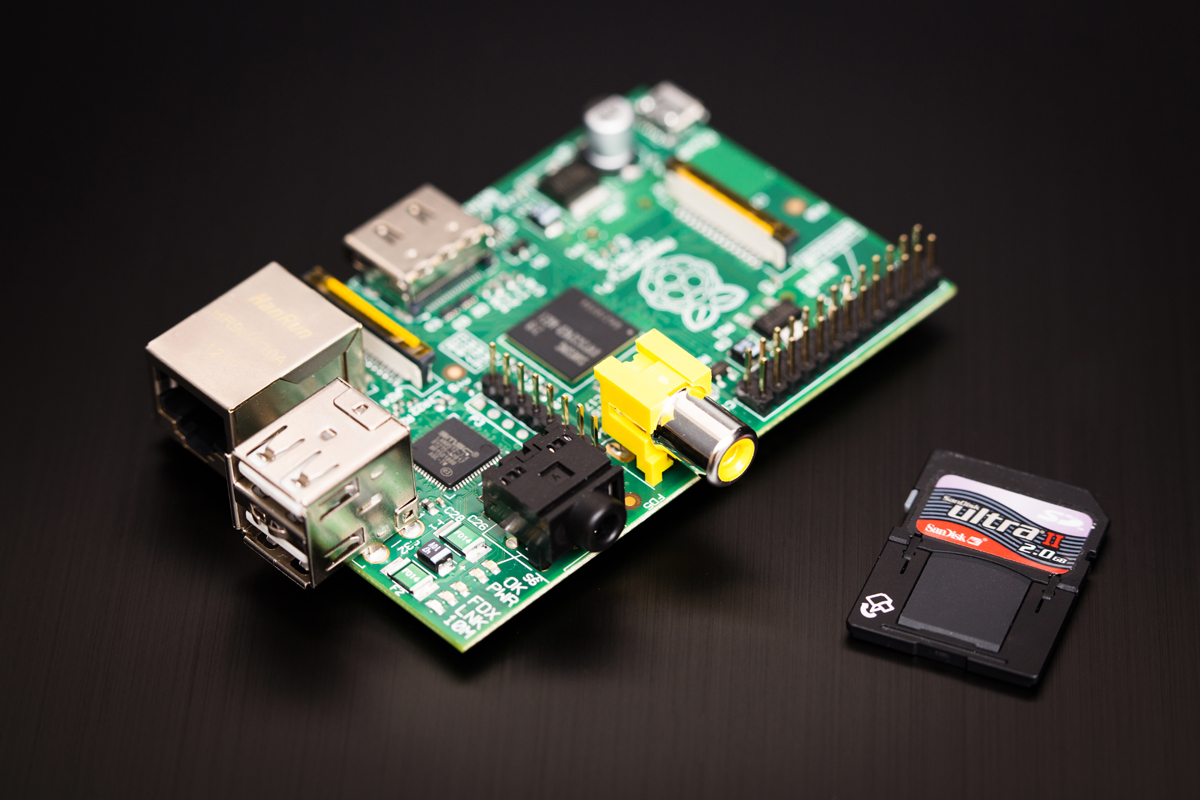
For those that don't know, this is a Raspberry Pi. A $35 ARM based, Linux run computer that is both low powered in energy and specs. But this was perfect for my little project as I wanted the application running all of the time without a power hungry PC having to be on. So as C# was out I falled upon the other language I had a bit of experience in. C++. This proved to be a bit of a challenge as the last time I used the language was in University and turns out I've been a bit spoiled by the niceties of C#.

I finished building the application about a week ago on a Windows environment, and the last week has been trying to get the application running on another friend's Raspberry Pi. It was hard. But this was due to a mixture of my Windows compilier (MinGW) compiling things a little differently to linux's default compiler (G++) and my lack of knowledge when using Linux itself. But it works as I intended. However this is not the end as some missing features need to be added that will make using the service more useable. A task it seems for the weeks ahead.

Saturday, 30 June 2012

Been A Bit Quiet Lately...


Wow...two weeks have passed and this blog has been awfully quiet. Well, that's because the combination of work and Dream.Build.Play took quite a lot out of me, so I decided to take a bit of time off. Played a few games here and there and tried to forget about Do You Know. But I find it very hard to unwind and forget about projects, so it wasn't too long before I was back working on it.

I started off by compiling a list of what I wanted to get done before I put the game into it's first playtest. This list consisted of mainly items I wanted to get done before I submitted to DBP and a few extras I thought would be nice. At the time of writing I've managed to get most of the list done, but in my opinion the game is still too rough to put into playtest. So my plan of putting it in at the end of the month (i.e. today) is not going to happen. But I will divulge some of the new features that have made it into the game.

The first as you can see is that the podiums now show the answer the players have decided on. This is how I'm going to convey the selected answers to the players. This is a feature that I wanted to include in my DBP submission, but as time slipped by this seemed like a very risky thing to implement. In the end though, through some in my opinion trickery, this didn't take too long to implement. To avoid cheating I've also included a spinning question mark which is displayed when a player answers, but is waiting for either time to run out or all other players to answer. This new feature is also complimented by the host speaking when getting to the point where the answers are shown. I however am not sure if this is done too much. I guess that first playtest will answer that ;)

I've also managed to implement the clapping animation into my audience members, which means no longer do I have an applause sound effect playing with no source of where it is coming from. Yes, I did submit this "feature" into my DBP submission. I've set it up so I can make them applaud on the fly, which I will hopefully be incorporating into gameplay in the future. For instance, when a player answers correctly, the camera cutting away to the audience clapping.

The past couple of weeks has also led me to finally installing some form of version control and automated back up on my computer. For version control I went with the Mercurial/HGTortoise combo and set up repos on an external hard drive. The main reason for this was because I use it on a daily basis at work so I am instantly familiar with it. But it couldn't have gone any better as the installation was simple and I was version controlled within minutes. I don't know why I hadn't done this sooner. Perhaps my initial commit message wouldn't have been so big if I had :p

For automated back up I was recommended CrashPlan by a work colleague. This tool allows you to schedule how often to backup and where to do it, with options including folders elsewhere on the oomputer (what's the point), other peoples computers or to their online servers (for a small fee). It also provides backup summaries by email if you so wish and will also send alerts if you data hasn't been backed up for whatever reason. This is all well and good, but the one place it doesn't support backup to is a networked drive, which means I can't stick my backup drive on my network. Boo!

So that's what has been happening. I hope to get some more done in the coming weeks that will give the game more polish and get that first playtest into action. I'm now off to do some "research"...